Mac- How to print with a staple on a mac using Microsoft Word
Updated: 03/23/2026
Article #: 359
Mac- How to print with a staple on a mac using Microsoft Word
1) Go to System Settings on the mac > Printers & Scanners > Choose the HP Papercut printer
2) Go to the Options tab and change the settings in order to staple in Word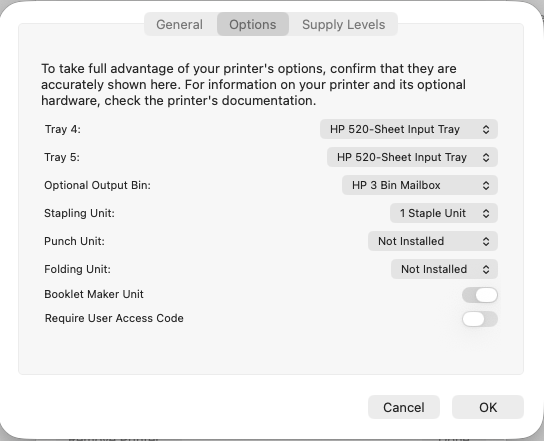
3) Press the Ok button. The open Microsoft Word on the mac. Make sure that Microsoft Word on the mac is not open needs to be launched.
4) Choose the document that you want to staple in Microsoft Word
5) Go the Printer Options section when the Print windows for Microsoft Word is open on the mac
6) Then select Finishing and then choose the following settings:
a) Output Bin: Output Bin 2
b) Staple: Choose the option that you want [Most cases are One Staple Left]
c) Press the OK button
7) Then press the Print button
|
Rate this Topic:
|
|||
|
